
Regex filters
Here are the two Search Console regex filters mentioned in the video:
Long query regex (more than 5 words): ^([^ ]+ ){5,}[^ ]+$
Question query regex: ^(who|what|where|when|why|how|should|can|is|are|does|which)\b
Script: AI performance data in Search Console and GA4
We are far from having the full picture of our website performance in AI engines, but Search Console and GA4 have released new AI performance reports which we can monitor to find useful insights.
In the video I cover the following:
What can we measure directly?
New Generative AI report in Search Console
What can we investigate?
Changing search behaviour → long/question queries in the normal Search Performance report in Search Console.
What traffic actually reaches our website?
AI referrals → GA4.
What can we measure directly?
There’s a new Generative AI report in Search Console. But first, a bit of terminology:
Mentions are when your brand or organisation are mentioned in a response with no link to your website.
Citations are when a link to your website is presented in responses.
Clicks are when someone clicks through to your website from a citation.
We can’t see mention or citation data for most of the AI engines. However Google now gives us some direct visibility data for its own generative AI search features – AI Overviews and AI Mode – through Search Console.
For other AI engines – you can subscribe to paid tools manually query these to get an indication of visibility. Though keep in mind that research has shown that responses vary greatly across different AIs, and that the same AI will give different responses to the same question over time.
At Lanalytics we like to do manual testing to get an idea of brand visibility in AI and identify major persistent themes. We use a spreadsheet to do this – you don’t necessarily need expensive tools.
Let’s have a look at the new Gen AI report in Search Console.
Access the report in the left side bar. Here you can see the URLs that have appeared in Google AI features, along the volume of Impressions, or number of times they have appeared.
Generative AI report in Search Console:

The report shows which of your website pages appear in AI Overviews and AI Mode, or citations. It doesn’t show when your brand is mentioned in AIOs, the search queries which generate the citations, or when people click to your site.
This report was rolled out in waves, so you may just have a few weeks of data.
What we can investigate
There’s another thing I’m interested in looking for: whether search behaviour itself is changing as people become more accustomed to AI.
In Search Console, AI search data is mixed in with traditional search data in the general Performance report. We can use regex filters to isolate longer searches or searches phrased as questions. These aren’t necessarily searches that generated an AI Overview, but we can use them to look for signs of more conversational search behaviour – and to understand what people are asking about our topics.
Apply these in the general ‘Performance report’:
- select ‘Add filter’ in the top navigation
- select the ‘Query’ filter
- from the ‘Queries containing dropdown select the ‘Custom (regex)’ option and enter one of the regex filters below.
Long query regex (more than 5 words): ^([^ ]+ ){5,}[^ ]+$
Question query regex: ^(who|what|where|when|why|how|should|can|is|are|does|which)\b
What AI traffic actually reaches our website?
AI referrals in GA4 – AI Assistant
Google’s AI search features are measured through Search Console. For referrals from other AI assistants that actually reach your website, we can use GA4.
This is now an official default GA4 channel. Google defines AI Assistant as traffic from sources such as ChatGPT, Gemini, DeepSeek, Copilot and Grok. But it excludes Google’s AI Overviews and AI Mode.
Note that this channel doesn’t capture all AI referrals, so use it as an indication only.
The first step is to see what AI engines are sending you traffic.
AI referrals in the GA4 Traffic Acquisition report:
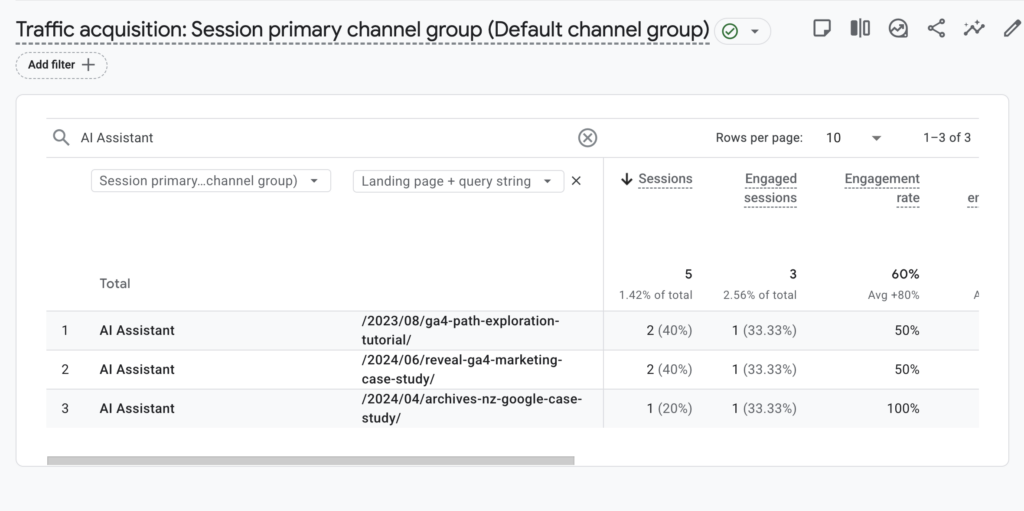
To see AI referrals to your website in the Traffic acquisition report:
- search for ‘AI Assistant’ to isolate this channel
- to see the AI engines sending traffic to your site, add a secondary dimension ‘session source’
- to see the pages where people land from AI engines, add a secondary dimension ‘Landing page + query string’
Now see what pages people are landing on from AI, and this is where it gets interesting.
- Which pages lead to a long engagement time on your site?
- If two pages on a similar topic are receiving AI traffic and one consistently generates more engagement, that’s a useful signal to investigate.
- Don’t make major changes based on small amounts of AI traffic.
AI traffic is still small for many organisations. Don’t make major website changes based on tiny numbers. Monitor it over time and look for persistent patterns.